
Tracking Event ROI with HubSpot
Learn how to measure the full impact of your events using HubSpot data — from registration to revenue.
Overview
Event marketers and RevOps teams often struggle to connect event participation to downstream revenue impact. event•hapily solves this by enabling full event attribution inside HubSpot — allowing you to understand which events drive pipeline, deals, and ROI without leaving your CRM.
This guide walks through how to configure and analyze Event ROI in HubSpot using event•hapily’s native reporting capabilities.
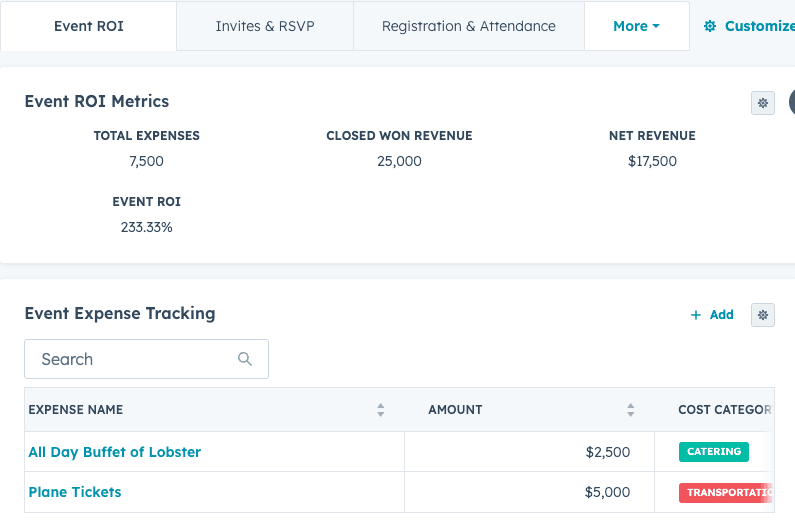
What You’ll Learn
By the end of this guide, you’ll be able to tell the story of ROI for your events
Step 1: Create your Expenses object and associate it with hapily events
Identify Event Influence on Pipeline
Build Your Event ROI Dashboard

-
Navigate to Reports → Dashboards → Create Dashboard
-
Choose Custom Report Builder
-
Select the following objects:
-
Events
-
Registrations
-
Deals
-
-
Configure your associations:
-
Event → Registration → Contact → Deal
-
-
Add relevant properties such as:
-
Event Name
-
Deal Amount
-
Event Type
-
Lifecycle Stage
-
Suggested reports:
-
Revenue Influenced by Event
-
Top Performing Event Types
-
Deals Created by Event Attendance
-
ROI by Event Sponsorship Level
These dashboards provide a full-funnel view of how events drive measurable business outcomes — from awareness to closed-won deals.
Once your dashboard is live, compare event performance over time using HubSpot filters or date ranges.
Common comparisons include:
-
This quarter vs. last quarter
-
Hosted vs. sponsored events
-
Virtual vs. in-person performance
Track Cost per Registration and Revenue per Event to see where your highest return on investment lies.
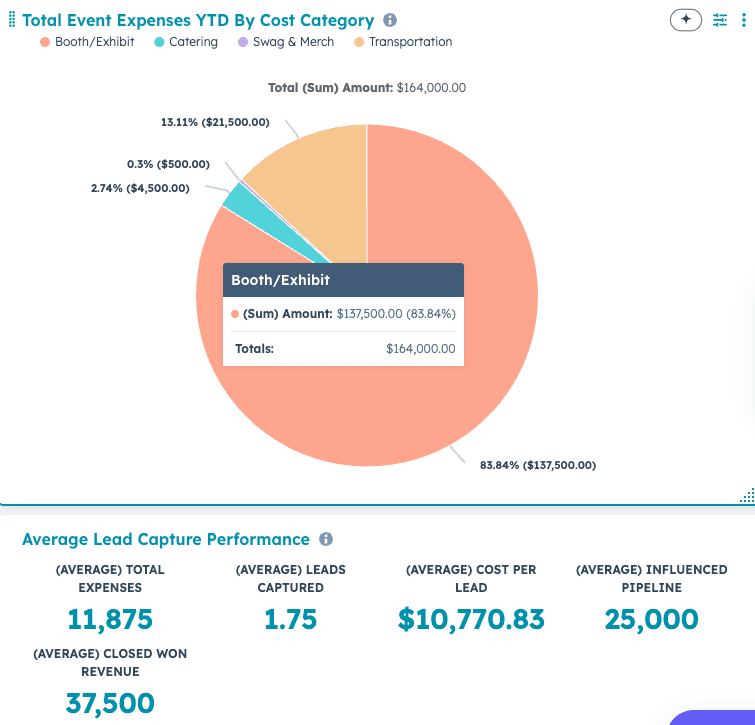
Example ROI Formula
To calculate ROI on an event record, use a custom HubSpot calculated property using roll-up properties that take the SUM of expenses subtracted by the roll-up of the attributed or influenced deals.
(Event Influenced Revenue – Event Cost) ÷ Event Cost
This formula provides a percentage-based ROI that can be charted over time in your dashboard.