
Using a HubSpot form at a trade show booth or on a landing page is a seamless way to collect attendee information. By utilizing a hidden property, hapily automatically associates every person who submits the form with your specific event and applies the correct association label.
This approach allows you to:
-
Convert any standard HubSpot form into an event-specific lead capture tool.
-
Automatically apply the Event Lead association label to new or existing contacts.
-
Eliminate manual data entry and CSV imports after a live event.
🎥 Video Walkthrough:
How to | Capture Event Leads with HubSpot Forms - Watch Video

Step 1: Secure Your Event Record ID
-
Open the hapily Event Builder or navigate to your specific event record in HubSpot.
-
Locate and copy the Record ID of the event from the About this event section or the browser URL.
Step 2: Configure the Lead Capture Trigger Property
-
In HubSpot, navigate to Marketing > Forms and open the form you want to use.
-
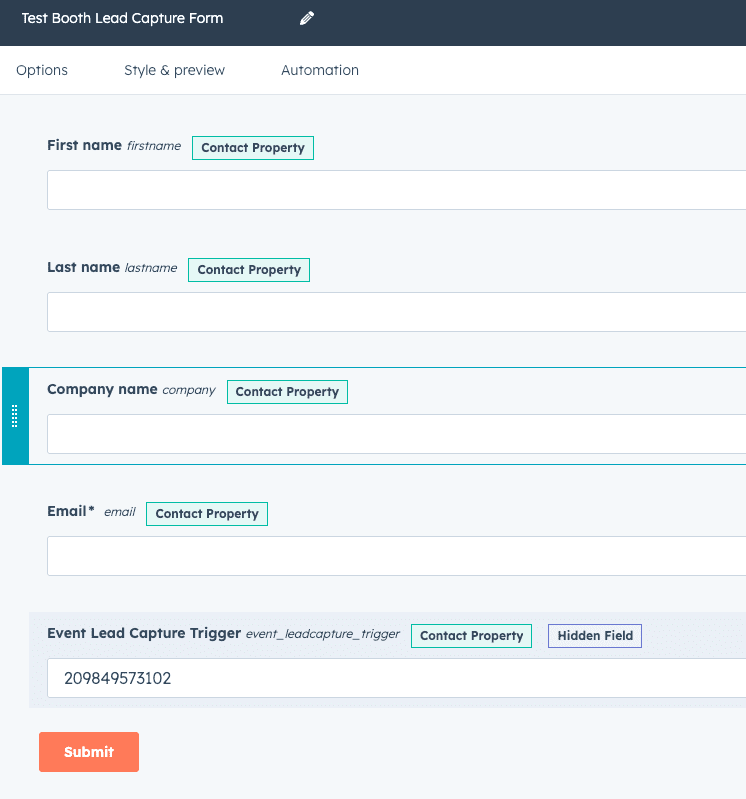
Search for the property Lead Capture Trigger in the left-hand panel.
-
Drag and drop the Lead Capture Trigger property anywhere onto your form.
Step 3: Set the Hidden Value
-
Click on the Lead Capture Trigger field within the form editor to open its settings.
-
In the left-hand sidebar, check the box labeled Make this field hidden.
-
In the Default value field, paste the Record ID you copied in Step 1.
-
Click Update and Publish the form.
Optional Step 4: Test the Live Submission
-
Open your published form link and submit a test entry (e.g., "Stan Lee").
-
Upon submission, hapily detects the ID in the trigger property and instantly creates the association.
-
Navigate to your event record in hapily and check the Lead Capture section. Your test contact will appear there with the Event Lead label automatically applied.
Summary
✅ Added the Lead Capture Trigger property to a standard HubSpot form.
✅ Configured the field as a hidden property with the Event Record ID as the default value.
✅ Verified that submissions instantly appear as Event Leads within the hapily interface.