Video Overview:
How to add the module to your quote template:
- Navigate to Design Manager
- Find the folder named 'quote·hapily'
- quote·hapily_template_modules
- qh_conditional_rich_text_2
- quote·hapily_template_modules
- Find the folder named 'quote·hapily'
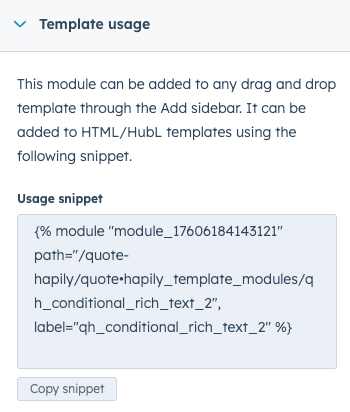
- Copy the 'usage snippet code' - Scroll down on the right column to the very bottom and copy the code here:
- Navigate to your quote template HTML file (in Design Manager)
- Paste the usage snippet code wherever you'd like the module to be
- Pro Tip: You can use this module multiple times on the same quote - just use different deal properties.
- 'Publish' your quote template HTML file
- Navigate to 'Settings'
- Quotes
- Quote Templates
- Quotes
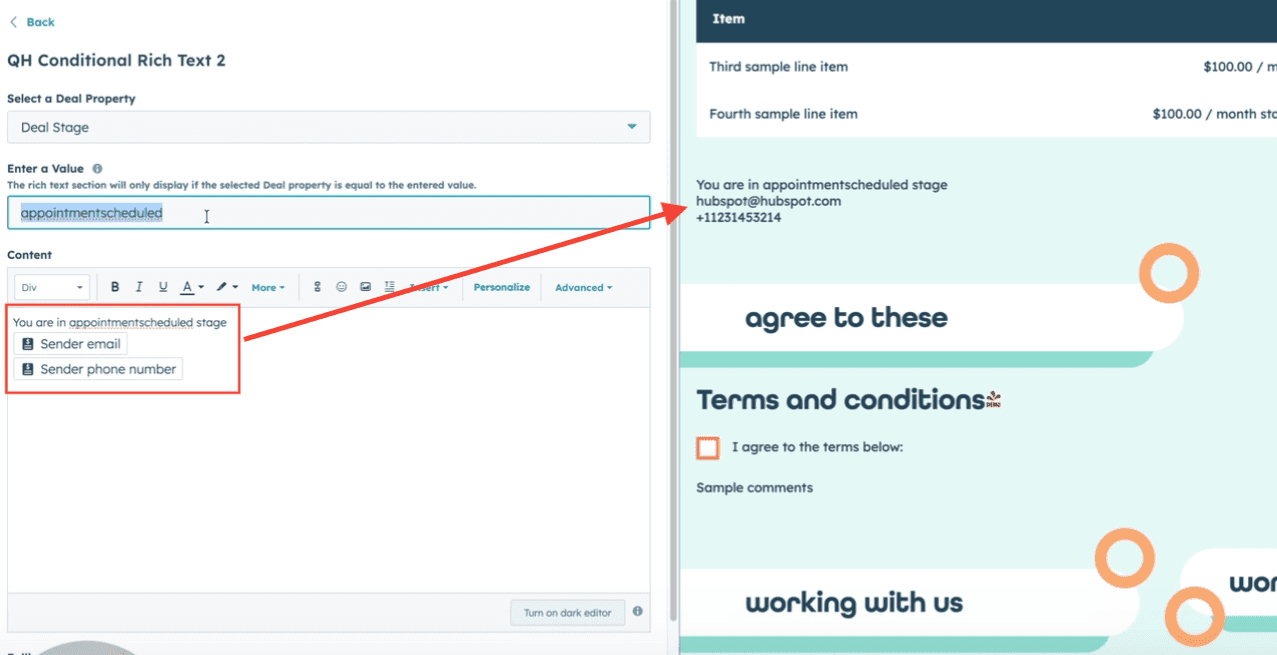
- Select your quote template that has this new module and pick the Deal property and values you'd like to use to display Rich Text
- You can use personalization tokens to dynamically grab data and render it on the quote template
- You can use personalization tokens to dynamically grab data and render it on the quote template
- Hit 'Save'