
Why you’ll want to use them
- Simplify your catalog — Avoid creating dozens, hundreds, or thousands of separate near-identical SKUs just because one property changes (e.g., color or finish).
- Reduce quoting complexity — Sales reps don’t need to sift through long product lists or guess the right SKU version. They simply pick the attributes and the correct price populates.
- Move away from spreadsheet chaos — Instead of manually maintaining large Excel pricing workbooks, you upload a structured pricing sheet that our system reads and uses directly. This reduces version conflicts, errors, and operational risk.
- Scale easily — As your product catalog grows and your pricing rules become more complex, Product Variants give you a clean, repeatable format for pricing combinations rather than ad-hoc SKU creation.
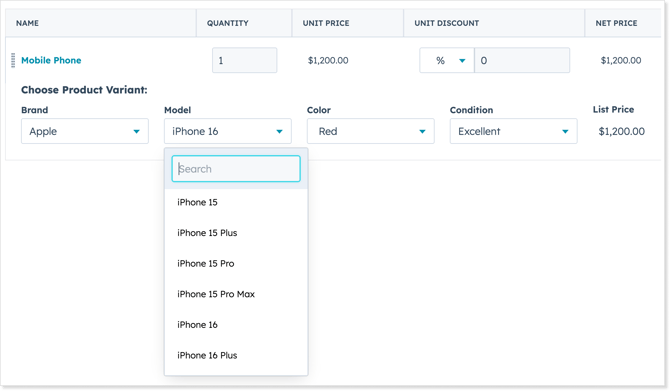
Real-world example
Imagine a company that sells used mobile phones. They may price based on attributes like:
- Brand (e.g., Apple, Google)
- Model (e.g., iPhone 12, Pixel 6)
- Color (e.g., Black, Silver)
- Condition (e.g., Excellent, Good, Fair)
Rather than creating a separate product entry for “Apple-iPhone 12-Black-Excellent”, “Apple-iPhone 12-Silver-Good”, etc., you define one base product (for example: “MobilePhone”) and set the attribute-properties accordingly. The system then uses those attributes to compute the correct price for each combination.
When to use Product Variants
Use Product Variants when:
- You have a base product (e.g., a car, a phone, a device) and that product’s price depends on several selectable attributes (make/model/trim/color, size/color/finish, etc.).
- You want to avoid SKU explosion — many minor variants of essentially the same product.
- You want to move away from manual spreadsheet-based pricing for each combination.
You might not want to use Product Variants when:
- Each version of the product is truly unique and requires totally different purchase or production logic (i.e., it’s not just attributes changing).
- You have very few attribute variations (for example just one attribute or only two options) and managing them manually is sufficient.
How it works (conceptually)
- Pick the product you want to turn into a Variant-managed item.
- Choose up to 8 enumerable product attributes (for example: Make, Model, Trim, Color).
- Optionally customize the dynamic SKU pattern (for instance: CAR----).
- Download the sample pricing sheet (CSV) with columns for each attribute, plus currency and price.
- Fill in your prices for all combinations in the sheet.
- Upload the updated sheet — the system ingests it and replaces the variant pricing table for that product.
- When sales reps create a quote, they select attribute values; the system uses the matching row in the variant pricing table to determine the correct price.
- If any required attribute is missing or no matching combination exists, a pricing exception is thrown and the line item requires manual adjustment.
Plan availability
Product Variants are part of the Advanced Pricing family of features in the quote•hapily Enterprise plan.