
With the introduction of advanced registration features, hapily gives you multiple ways to capture registrations for your events.
When you're working inside the Event Builder, you'll start by filling out your usual event details (like date, time, and location) to spin up the event record inside HubSpot. Once you move to the next screen, you get to choose exactly how you want to handle the registration experience.
This approach allows you to:
-
Choose between native HubSpot forms, advanced registration flows, or external data tracking.
-
Clone existing HubSpot forms instantly and link them directly to your event workflows.
-
Re-use successful registration layouts, pricing, and capacities from your past events.
-
Collect group or guest registrations without being forced to gather unique email addresses for every single attendee.
hapily Registration Types Explained - Watch Video
Step 1: Choose your Registration Type
-
Open the Event Builder in hapily and start creating your event.
-
Fill out the initial required fields, including the event name, date, time, and location to create the corresponding record in HubSpot.
-
Click next to advance to the registration configuration screen, where you will see your available registration method options.
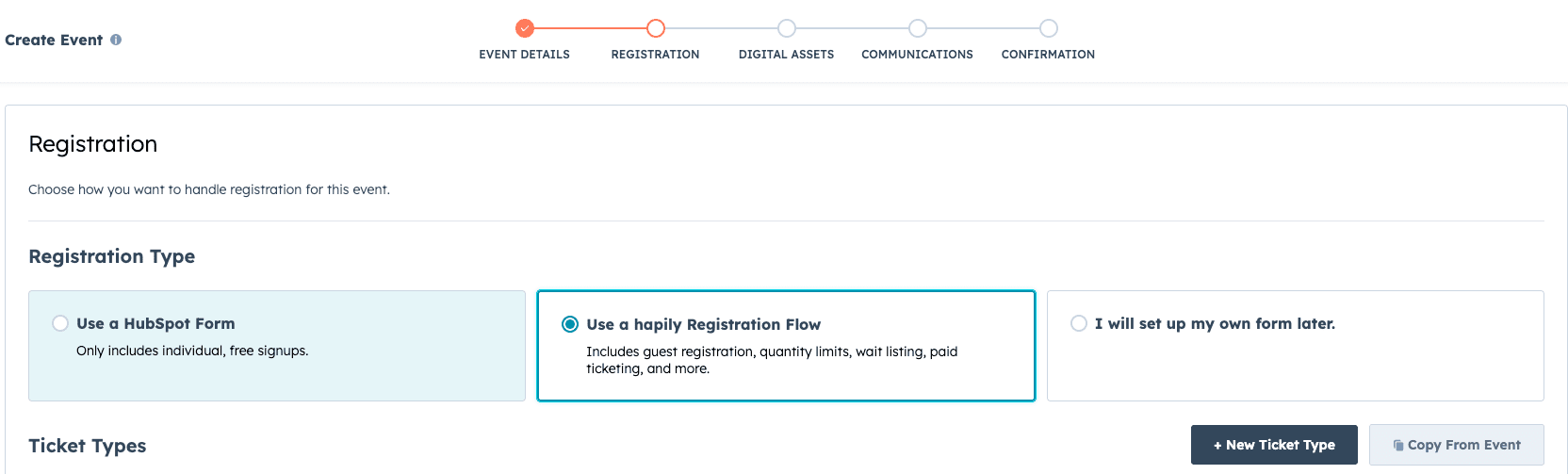
Option 1 - Use a Standard HubSpot Form
-
Select the HubSpot Form option if you want to use traditional form tracking.
-
Choose to have the Event Builder automatically clone an existing HubSpot form and assign it to this specific event.
-
Once published, any time a contact submits this form, hapily automatically registers them inside HubSpot and creates a clean registrant record.
Note: When using a standard HubSpot form, registering multiple guests still requires a unique email address for every single person being registered.
Option 2 - Use an Advanced Registration Flow
-
Select the Registration Flow option if you need more granular control over your attendee experience.
-
To save time, choose to copy an existing registration setup from a previous event (like a past workshop). This automatically pulls over your previous pricing, capacities, and the exact attendee question details you used before.
-
Guest Registration: Unlike standard HubSpot forms, a registration flow lets a single buyer claim multiple registration types without needing an email address for every guest. You only need the contact info for the primary person processing the registration.
Option 3 - External or Data-Only Registration
-
Select the option to set up your registration later if you aren't using hapily to directly process sign-ups. Maybe you're leveraging hapily's Lead Capture functionality and not collecting registrations for this event.
-
Use this method if you are strictly using the event for manual lead capture or simply utilizing hapily as a backend data layer within HubSpot.
-
Save your settings to finalize your event data structure without turning on an active customer-facing registration portal.
Summary
✅ hapily gives you the flexibility to choose the exact registration method that fits your event goals.
✅ HubSpot forms seamlessly map submissions directly to new registrant records in your CRM.
✅ Registration flows unlock advanced multi-guest sign-ups without requiring unique guest email addresses.
✅ Past event layouts can be copied instantly to duplicate pricing, limits, and custom questions.